
One rig for your guitar or bass plugins
You might like the wah in one guitar plugin, the amp in another, and a separate delay. A standalone VST3 plugin host puts those compatible plugins in one signal chain so you can play without opening a DAW project.
Neural DSP plugins already include standalone applications. A host is useful when you want to combine multiple plugins, save their settings together, or use them alongside practice and looping tools. Jam Rig supplies that workspace; you bring your installed, licensed plugins.
The same approach applies to compatible VST3 plugins from other makers: Universal Audio (UAD), IK Multimedia’s AmpliTube and TONEX, Line 6 Helix Native, and more. You can start with an amp suite you know and add a separate effect around it.
Bass uses the same rig workflow: load compatible bass amp, cabinet, and effects plugins, save the chain, and link the sound to a practice song. Choose amp and cabinet processing that suits the instrument you are playing.
What you need
- An audio interface with a suitable instrument input for guitar or bass, or a compatible USB audio-capable amp.
- Compatible 64-bit VST3 effects installed and activated. Choose the VST3 option in each plugin’s installer.
- Your audio device and input/output channels selected in Jam Rig. The audio setup guide covers the starting points.
Universal Audio offers both native UADx and DSP-based plugins. Native plugins use your computer’s processor; DSP plugins require supported UA hardware. Loading a plugin in Jam Rig does not replace its license or hardware requirements. Start with one plugin and confirm it passes audio before expanding the chain.
Combine effects from different plugins
Guitar or bass → wah or overdrive → amp → cabinet / IR → delay or reverb
- Add the first effect. If it is part of an amp suite, switch off the amp and cabinet sections you do not want to use.
- Add your amp plugin. Enable the amp you want and check which cabinet processing it already includes.
- Choose a cabinet stage. Use the amp plugin’s cabinet or a separate compatible IR-loader plugin. Avoid adding a second cabinet by accident.
- Add your finishing effects. Put a separate delay or reverb after the amp for a clear starting point. Listen as you adjust the order and levels.
For example, combine a wah from a Neural DSP plugin with another plugin’s amp, then add a compatible UAD delay. Use each plugin’s own bypass controls to leave only the sections you want active. Check the plugin’s manual if an amp, cabinet, or effect stage cannot be switched off.
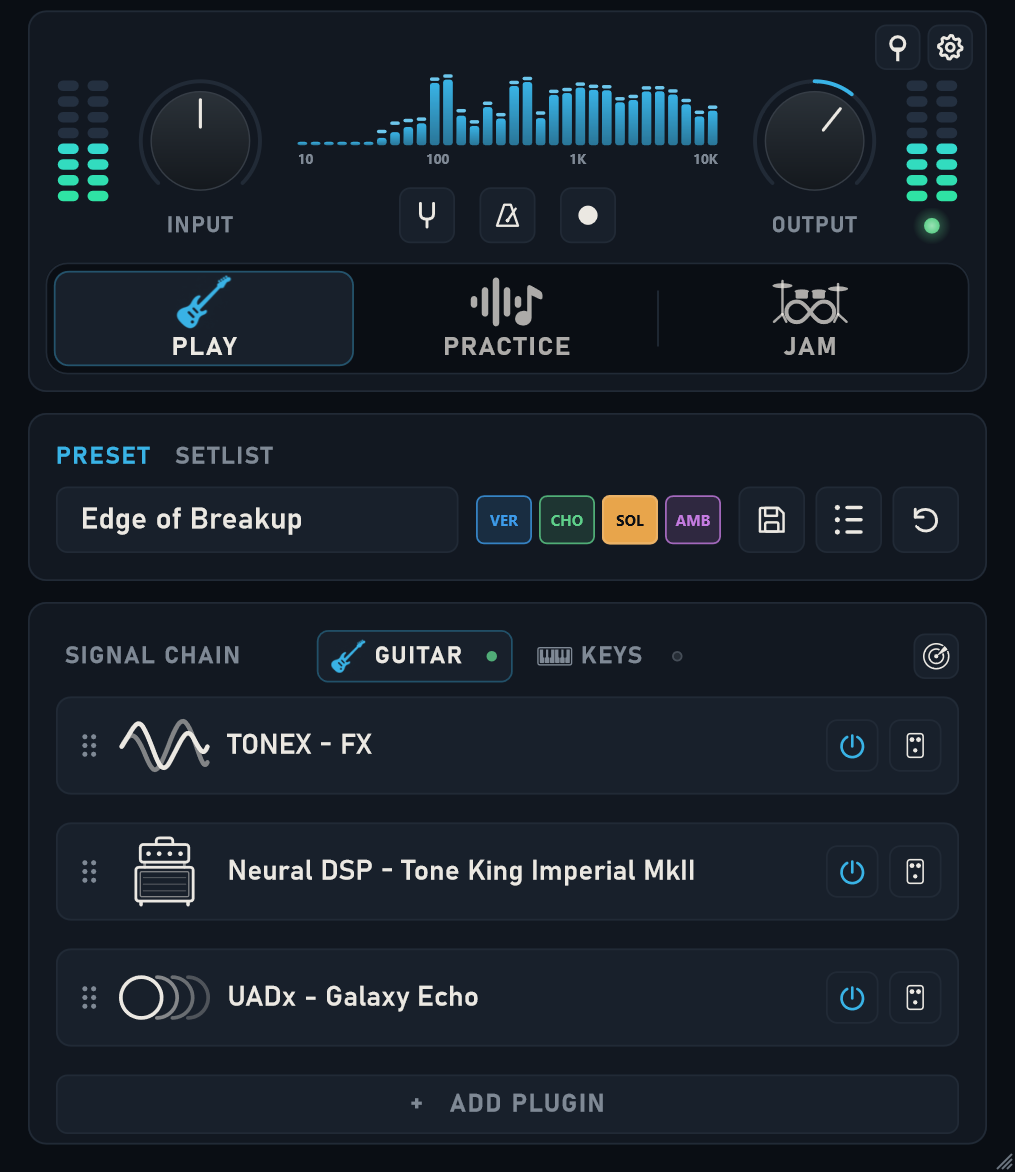
Save the sound, then make it playable
Save the full chain as a rig preset. Use scenes for variations such as a cleaner rhythm tone and a louder lead tone. Set up a supported MIDI footswitch if you want to change scenes without taking your hands off the guitar.
Once the rig is ready, link it to a practice song or use the dual looper and drums in Jam Mode. The backing-track practice guide explains how to keep your tone with the song you are learning.
The 7-day trial includes Play and Jam, with up to three plugins per chain. Practice unlocks with activation. You can start with one amp suite and one or two separate effects.
If the chain does not sound right
- Dark or muffled sound: check for duplicate cabinet or IR processing.
- Unexpected distortion: check the level leaving each plugin and whether two amp stages are enabled.
- Doubled guitar sound: check whether you are hearing both the interface’s direct monitor and the processed software signal.
- Crackles or delayed response: simplify the chain and adjust your device’s buffer size. The stable setting depends on your hardware and plugins.
- A missing plugin: confirm that the 64-bit VST3 version is installed and licensed, then rescan.
For plugin-specific requirements, see Neural DSP’s plugin quick start guide and Universal Audio’s native and DSP explanation. Jam Rig is independent of these manufacturers.